Retrieving Content from Trash
Exponential uses a “trash” container (familiar from common operating systems like Windows and Mac OS X). When you remove content, you are actually just moving it to the trash container. It can be restored at any time up until the trash container is emptied.
To remove content, browse to the desired object and click on the Remove button on the Website Toolbar. Alternatively, for embedded content, click on the Delete button near the content object.
You will be prompted to specify whether the content should be moved to the trash or deleted completely:
Be very careful when removing and deleting content, since these actions also affect other content on the site:
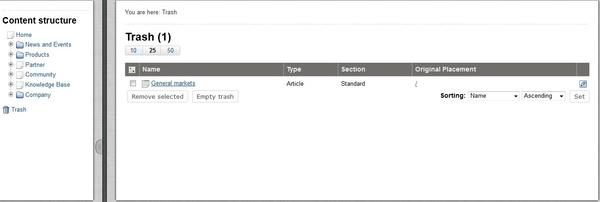
To retrieve removed content from the trash container, log in to the Administration Interface and click on the Trash icon on the left side.
Retrieving Content from Trash
The trash container has a “flat” structure, which means that all objects are listed at the same level regardless of their place in the original content hierarchy.
To restore a content object from the trash, click on the pencil icon in the right column. You will be prompted if you want to restore the object to its original location or to a new location. After specifying the location, click OK.
If you try to retrieve content to a location where the original content container has been removed, you will be forced to choose a new location for it.
Powered by Exponential™ CMS Open Source Web Content Management. Copyright © 1999-2013 eZ Systems AS (except where otherwise noted). All rights reserved.