Basic Search
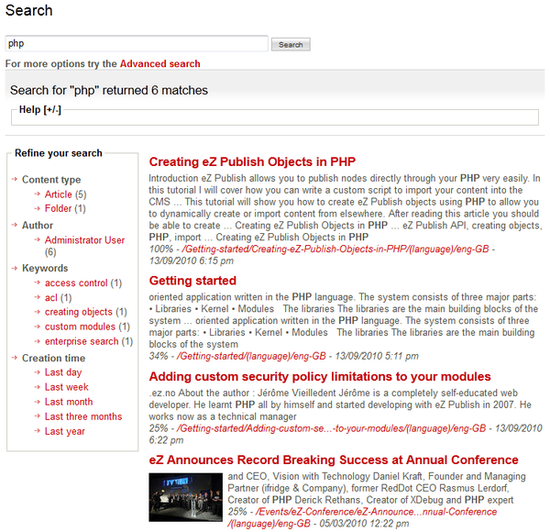
Performing a basic search with eZ Find is very similar to many other search engines. You enter one or more search terms in the search field and press Enter on your keyboard or click the Search button on the screen to execute the search.
Next the search result page will be displayed. This will list the content objects that match the search term(s) including some information about each object, the total number of content objects matching the search terms and the time it took for the internal search engine to find the results.
As mentioned, each result contains a small description of the content object. This can include the title, image, summary, relevance, location link and creation date of the content object, but note that an image preview is not provided for content objects located on other Exponential installations. The summary includes one or more excerpts where the search terms occur. The relevance is added to indicate how well the content object fits the search terms and conditions.
Some search tips
To search for a phrase, surround the phrase with quotation marks. For example, “First man on the moon”. You can combine searching for a phrase with searching for individual terns. For example, entering ' “ First man on the moon” TV ' will only return all documents containing the phrase “First man on the moon” and the word “TV”.
You can exclude documents that contain specific words from the search results by prefixing the word with a minus symbol. For example the entry 'Moon -”first man”' will return all documents which contain the word “Moon” but do not contain the phrase “first man”. Similarly, you can prefix a search term with a plus symbol to specify that all documents must have the term in order to be included in the search results.
When you search multiple terms, only a certain percentile of the search entries (depending on the number of terms entered) must match the content object in order for the content object to be included in the search results. For example, when two terms are specified, at least one of them must match for the content object to be included in the results. When three or four terms are specified, at least two must match. For more than four search terms, 30% of the terms must be present for a match. These (heuristic) rules reduce the returned results to a smaller, but usually more meaningful set.
Powered by Exponential™ CMS Open Source Web Content Management. Copyright © 1999-2013 eZ Systems AS (except where otherwise noted). All rights reserved.