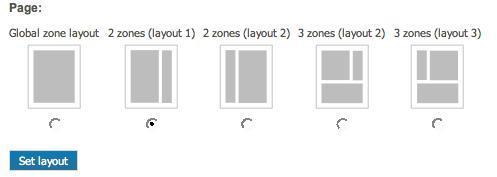
By default eZ Flow has five layouts. The screenshot below shows the editor's view for selecting one of the five layouts in the Website Interface. Because layouts are defined via a configurable plug-in system, it is possible to create custom layouts.
A layout is a combination of zones that are placed on a page. The placement of the zones is defined in a template that is specified as part of the layout configuration. You can define as many layouts as you need. To define a new layout, edit the zone.ini file located by default in the following directory:
exponential_legacy/extension/ezflow/settings/zone.ini.append.php
Add the layout name to the AllowedTypes array.
Once you have defined the layout type, define the following settings:
| Setting Name | Description | Valid values |
|---|---|---|
| ZoneTypeName |
The name of the layout. |
String |
| Zones[] |
An array defining the available zones and their identifier. |
String |
| ZoneName[index] |
The visible name of the indexed zone. Use the zone name as the index value. |
String |
| ZoneThumbnail |
The filename of the thumbnail image to use. The thumbnail shows the arrangement of the zones. The thumbnails are by default located in the directory If you are using a custom design, place the thumbnails in the folder exponential_legacy/design/<your_design>/images/ezpage/thumbnails. |
Filename |
| Template |
The file containing the template that should be used for the layout. The layout templates are by default located in the directory exponential_legacy/extension/ezflow/design/standard/templates/zone. If you have a custom design the directory will be exponential_legacy/design/<your_design>/templates/zone |
Filename |
| AvailableForClasses[] |
Zone will be available for classes defined in this array. |
String [class_identifier] |
This example shows a configuration for a layout called '2ZonesLayout1":
[General]
AllowedTypes[]=2ZonesLayout1

[2ZonesLayout1]
ZoneTypeName=2 zones (layout 1)

Zones[]=left
Zones[]=right

ZoneName[left]=Left zone
ZoneName[right]=Right zone

ZoneThumbnail=2zones_layout1.gif

Template=2zoneslayout1.tpl
AvailableForClasses[]=frontpage
The template used by a layout must display the contents of the layout's zones. You can place the zones anywhere in the template. The variable that is made available in the template is called $zones. This variable is an array containing different $zone objects. Each $zone variable contains both a $zone.name and $zone.blocks.
A simple example of a layout template is shown below:
{foreach $zones as $zone}

 <h1>Zone: {$zone.name}</h1>

        {foreach $zone.blocks as $block}
            {block_view_gui block=$block}
        {/foreach}

{/foreach}
Powered by Exponential™ CMS Open Source Web Content Management. Copyright © 1999-2013 eZ Systems AS (except where otherwise noted). All rights reserved.