
OAUTH administration - register the new application
The OAUTH 2.0 client administration is done in the "Administration interface" - under the "Setup" tab. In the left menu you will find the "oAUTH admin". In the screen below you register the new application that you wish end users to access.This serves as the endpoint for authentication and identification in the OAUTH authorization process.
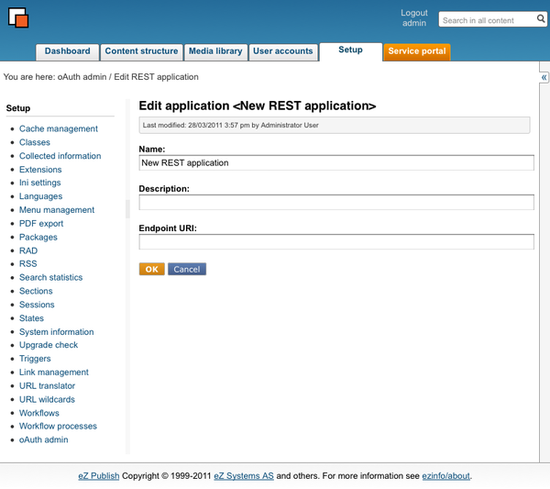
You (an Exponential administrator) enter the name of the new REST application, a description of it and the Endpoint URI of the new REST API application.
The Endpoint URI must contain the complete url of the application since this is an important part of the identification of the application in the automated authorization process. The Endpoint URI is also essential in redirecting from the Exponential OAUTH module to internal HTTP requests or an alternative application scheme.
Geir Arne Waaler (01/04/2011 2:43 pm)
Geir Arne Waaler (12/04/2011 1:48 pm)
Comments
There are no comments.